Kawak's Tomb (Awakened) Pre-Quest Chain Feedback
Hello,
I completed the currently accessible part of the pre-quest chain for Kawak's Tomb (Awakened), up to 428583 [Alarm in Limon]. I found several text inconsistencies, NPC issues, and one general presentation suggestion.
1. Issues in 428578 [The Faceless Clue]
The quest description contains the following sentence:
Quote
The Cursed Face Devourer reacted as if it knew him, that might be a clue.
Two independent clauses are joined only with a comma. A clearer version would be:
Quote
The Cursed Face Devourer reacted as if it knew him. That might be a clue.
The following dialogue has the same punctuation issue:
Quote
I am an Elf, that much is clear.
A corrected version could be:
Quote
I am an Elf; that much is clear.
The objective 647882 [Speak with the Envoy and investigate the Cursed Face Devourer’s connection.] is also unclear because it does not state whose connection is being investigated.
A clearer version could be:
Quote
Speak with 164993 [The Envoy] and investigate his connection to 139582 [Lanetli Yüz Yutan].
2. Issues in 428579 [Before the Seven Heroes]
The quest text says:
Quote
Speak with the three historians in front of it's entrance.
There are two separate issues here:
- The possessive form should be “its”, not “it's”.
- The quest requires speaking with three historians and also 119261 [Minx Shug], who describes himself as their guard. The instruction mentions only the three historians and does not mention the additional required NPC.
A clearer version could be:
Quote
Speak with the three historians and their guard in front of its entrance.
Objective 647884 is displayed as:
Quote
However, the actual NPC is 118965 [Fasda].
After completing the related conversation, 118965 [Fasda] also displays only:
Quote
This appears to be an incomplete or placeholder dialogue.
3. Duplicate and overlapping 165892 [Vivian]
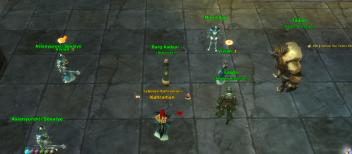
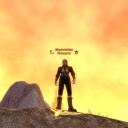
After completing the four conversations required for 428579 [Before the Seven Heroes], two copies of 165892 [Vivian] become visible at the same time.
Both copies allow 428579 [Before the Seven Heroes] to be turned in.
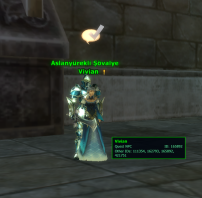
One copy is also positioned inside 118962 [Aslanyürekli Şövalye]. Their models and names overlap, making the NPCs difficult to distinguish and click.
The affected 165892 [Vivian] also displays a different interaction cursor than the usual quest-NPC cursor.
4. Issues in 428580 [A Face From Within]
The quest text contains:
Quote
The 139582 [Lanetli Yüz Yutan] knows we're on it's trail.
“It's” should be changed to the possessive form “its”.
The following section also appears unclear and contains a spelling error:
Quote
This was but a rogue thought about destroying us: ever since he regained life from the guardan tree, he's been growing more powerful.
“Guardan” should be “guardian”, and the first part of the sentence may need to be reviewed because its intended meaning is difficult to understand.
The general dialogue of 165892 [Vivian] also contains:
Quote
The Eye of Wisdom sent me to investigate the Envoys identity.
“Envoys” should be “Envoy's”.
The following wording would also be more natural without the second comma:
Quote
We believe this mystery might hold the key to achieving Omniscience, or at least prevent Albert from obtaining it.
5. Issues in 428583 [Alarm in Limon]
The quest summary contains:
Quote
Go find 116622 [Miela Lülepost] and learn of Kawaks history.
“Kawaks” should be “Kawak's”.
Objective 647888 contains:
Quote
Have Miela Curlfur explain to you the history of Limons hero
“Limons” should be “Limon's”.
During the dialogue, the following sentence is displayed:
Quote
'Pigheaded' is what you would call him today, but we cannot deny that his recklessness didn't bring us safety.
The double negative makes the sentence imply the opposite of the apparent story context. If the intention is that his recklessness protected Limon, a clearer version would be:
Quote
'Pigheaded' is what you would call him today, but we cannot deny that his recklessness brought us safety.
There is also a name inconsistency:
- Objective 647889 uses “Udakar Angerfang”.
- The system announcement uses “Udkar Angerfang”.
6. Suggestion: Consistent use of linked game objects
Some newer texts already use linked game objects correctly. For example, 139582 [Lanetli Yüz Yutan], 109024 [Kawak Angerfang], 116338 [Kawak Kızgındiş], and 116622 [Miela Lülepost] can be hovered to display their information.
This is very useful.
However, several earlier story dialogues mention maps, NPCs, and bosses only as plain text. For example:
- 750090 [Atlantis'in Kayıp Adası]
- 104464 [Annelia]
- 139582 [Lanetli Yüz Yutan]
Would it be possible to use linked game objects more consistently throughout the quest and story texts? This would make it easier for players to identify the referenced map, NPC, boss, or creature.
Are the duplicate 165892 [Vivian], the overlapping NPC placement, and the listed text differences intended? If not, could the related NPC states, quest texts, objectives, and linked-object usage be checked?
Thank you.

( this is not ping related problem ).